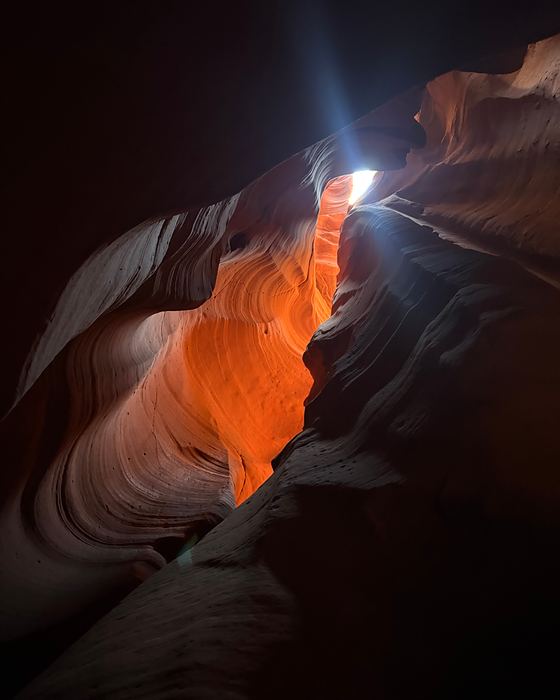
Sunrise over the Grand Canyon
Wander. It logs the rest.

Your world map,
filled in by itself.

A travel log that keeps itself. It records every country, city and date you visit, fills in past trips from your photos, and keeps it all on your phone.

On a computer? Scan with your phone's camera to get the app.

★ 4.4 in Japan · 1,000+ downloads · $6.99 once, no subscription

Or try it in your browser first: count your countries from your photos, free →

Grand Canyon, United States
Driftlog's map screen: a world map with 21 countries colored in, and progress by continent. Driftlog's diary screen: recent trips listed by country, with cities, dates and days stayed. Driftlog after reading a photo library: “Your map just filled in 21 countries.” Driftlog's page for Italy: visited 2 times, stayed 15 days, 3 cities, with each visit's dates.
  1. How it works

    From the day you install it.

    Install it, and your map starts filling in from the very next trip.

    1. Install & forget
    2. Backfill from photos
    3. Come home to a map
  2. 01 — Install & forget

    A diary that writes itself.

    Then just travel the way you always do. No check-ins to remember. And see where you were on this day, years ago — without ever writing an entry.

    Driftlog's diary screen: recent trips listed by country, with cities, dates and days stayed.
  3. 02 — Backfill from photos

    Years of old vacations, back from your camera roll.

    Driftlog reads your photos' locations and fills the map with trips you've already taken. It only sees photos that carry a location, and it never looks at the picture itself.

    Driftlog after reading a photo library: “Your map just filled in 21 countries.”
  4. 03 — Come home to a map

    Watch your world map fill in.

    Open the app to a world map that's already colored in, with a timeline of every trip. Every country you visit colors itself in. A map that's all your own.

    Driftlog's map screen: a world map with 21 countries colored in, and progress by continent.
  5. Memories

    Every visit, every city, remembered.

    Tap a country to relive the whole story — dates, cities and photos.

    Driftlog's page for Italy: visited 2 times, stayed 15 days, 3 cities, with each visit's dates.
A look inside

Your travels, beautifully kept.

Your whole travel life, year by year. Countries, trips, days on the road — all counted for you.

Passport

Collect a stamp for every country.

One passport-style entry stamp, drawn for each of 194 countries — no stock icons, no clip art. The stamps you collect in the app are the same drawings, and the poster is free to use.

See all 194 stamps →
Driftlog's passport screen: a grid of collected country stamps, 21 of 250.
Why Driftlog

Effortless. Private. Yours.

Privacy

Your history stays on your phone

Automatic — but yours alone. Most travel apps keep your location history on their servers. Driftlog doesn't.

  • Your travel history stays on your device
  • Your travel history is never sent to a server
  • No account, no ads, no tracking, nothing sold
  • Only place-name lookups and anonymous usage counts leave your phone

Your travel history is stored only on your device and is never sent to a server. To show a place's name, the app sends a coordinate, or a place you type in, to a place-name lookup (Apple's geocoder on iPhone). Apart from that, it sends only anonymous usage counts, such as how often the purchase screen opens, with no identifier, and you can switch them off in Settings. No account, no ads, no tracking.

Driftlog's account screen, with a note that your records stay on this device and that there is no account.
An empty prairie road running to the horizon at dusk in Saskatchewan, Canada.

It fills itself in

Runs quietly in the background, noting where you are only when you reach a new place. You never have to open it.

Easy on your battery

Driftlog does not keep GPS running. It only notes a place when you move to a new country or city.

Made by an indie developer

One independent developer, Akira Takashima of Shiori Studio. No ads, no tracking, nothing sold.

No account. Nothing to cancel.

There is no sign-up and no login.

Try it first

See your own map before you install anything.

We put the backfill part of Driftlog on the web, free. Drop in some photos and it reads the GPS inside them, works out which countries you have been to, and draws the map — in your browser, with nothing uploaded.

Count my countries — free

No signup. No upload. Works on any browser.

December 2026

Your 2026 in travel.

On December 1, Driftlog on iPhone puts your year together as a set of tall cards: a world map of this year's countries, your home country's map, then your days and trips. Share all of them or just one.

  • Example year card: 2026 in travel, 3 countries, on a world map, with the months of each trip.
  • Example year card: the home country's map with the regions visited in 2026.
  • Example year card: 21 days, 5 trips, 6 cities, and the longest stays.

Example cards, made from sample trips.

No app yet? The web version reads the dates and places in your photos, in your browser, with nothing uploaded.

What people say

Loved first in Japan.

Driftlog launched in July 2026. Most of its reviews so far come from Japan, where the same app is called ずぼ旅.

1,000+downloads since July 2026
4.4 ★App Store, Japan (22 ratings)
★★★★★

“When I loaded my photos, my whole travel history came back. It really moved me.”

Masapokku · App Store review, Japan, September 2026 · translated from Japanese
★★★★★

“It records where you've been without you doing anything. When you wonder ‘where was that place again?’, you know right away.”

名無しさんVol8 · App Store review, Japan, October 2026 · translated from Japanese

Ratings and downloads as of October 2026, from the App Store. Reviews are quoted in part. If you use Driftlog, a review on the App Store or Google Play helps other travelers find it.

Pricing

Buy once. Keep it forever.

One-time purchase
$6.99

Unlock every country's dates, cities and photos.
One-time purchase. No subscription, ever.

Free to start

The map, the country count, the passport stamps and the timeline are free, and so are the full details of the first three regions you visit in your home country and of your first foreign country.

$6.99 is the US price on the App Store and Google Play.

FAQ

Good questions.

What is Driftlog?

Driftlog is a travel log app for iPhone and Android. It records the countries, regions, cities and dates you visit by itself, in the background, and colors them in on a world map. It also rebuilds earlier trips from the location saved in your photos. It is made by one independent developer, Akira Takashima of Shiori Studio.

Does it drain my battery?

Very little. Driftlog does not keep GPS running. On iPhone it uses the system's low-power significant-location-change signal, and it only notes a place when you move to a new country or city.

Is my data really private?

Your travel records are stored on your device. There is no account and no server that keeps your records, and the App Store privacy label says Data Not Linked to You (Usage Data). Two kinds of request leave the phone. A coordinate, or a city name you type, is sent to the map service to look up a place name. And from iPhone 1.7.7 and Android 1.7.6, anonymous usage counts, such as how often the purchase screen opens, are sent with no identifier; you can switch them off in Settings.

Is there a subscription?

No. Driftlog is free to download and Premium is a one-time purchase, $6.99 in the US. There is no monthly or yearly fee and there are no ads.

What can I do for free?

The world map, the country count, the passport stamps and the timeline are free. The first three regions you visit in your home country (prefectures, states or provinces) and your first foreign country open in full, with every city, date and photo. Everywhere else still colors in your map and counts toward your totals; the details open with the one-time purchase.

Can it capture past trips?

Yes. Driftlog reads the date and location already saved in your photos and puts those trips on the map. It only sees photos that carry a location, and it never looks at the picture itself.

Does it record the route I took?

No. It records places and dates: country, region, city. It does not draw the path between them. If you want the exact road you drove, use a route recorder such as Google Maps Timeline.

iPhone and Android?

Both. Driftlog runs on iPhone and iPad with iOS 17 or later, from the App Store, and on Android, from Google Play, where it is listed as Driftlog: Countries Visited. The Android version is a separate native app, so its features and update timing can differ from the iPhone version.

Do I need an account?

No. There is no sign-up and no login, and nothing to cancel.

How does Driftlog count countries?

The app counts every country and territory that has a record, by two-letter country code, so Hong Kong or Puerto Rico count as their own entry. The free Driftlog Counter on the web counts the 193 UN member states plus Taiwan.

Is Driftlog the same app as ずぼ旅?

Yes. ずぼ旅 (Zubotabi) is the Japanese name of the same app. Other products called Driftlog, among them a fly-fishing journal, a road-trip journal and a developer tool, are unrelated to this one.

Dusk over the Grand Canyon.
Available now

Your map is waiting.

Driftlog is live on the App Store and Google Play. Install it free, and let your travels fill in the rest.

iPhone, iPad and Android. Made by an indie developer.